Connecting SAP Business One to another business system, e-commerce store, CRM, warehouse system, payment platform, or custom application sounds simple at first. Data leaves one system and enters another.
The difficult part is deciding how that exchange should happen.
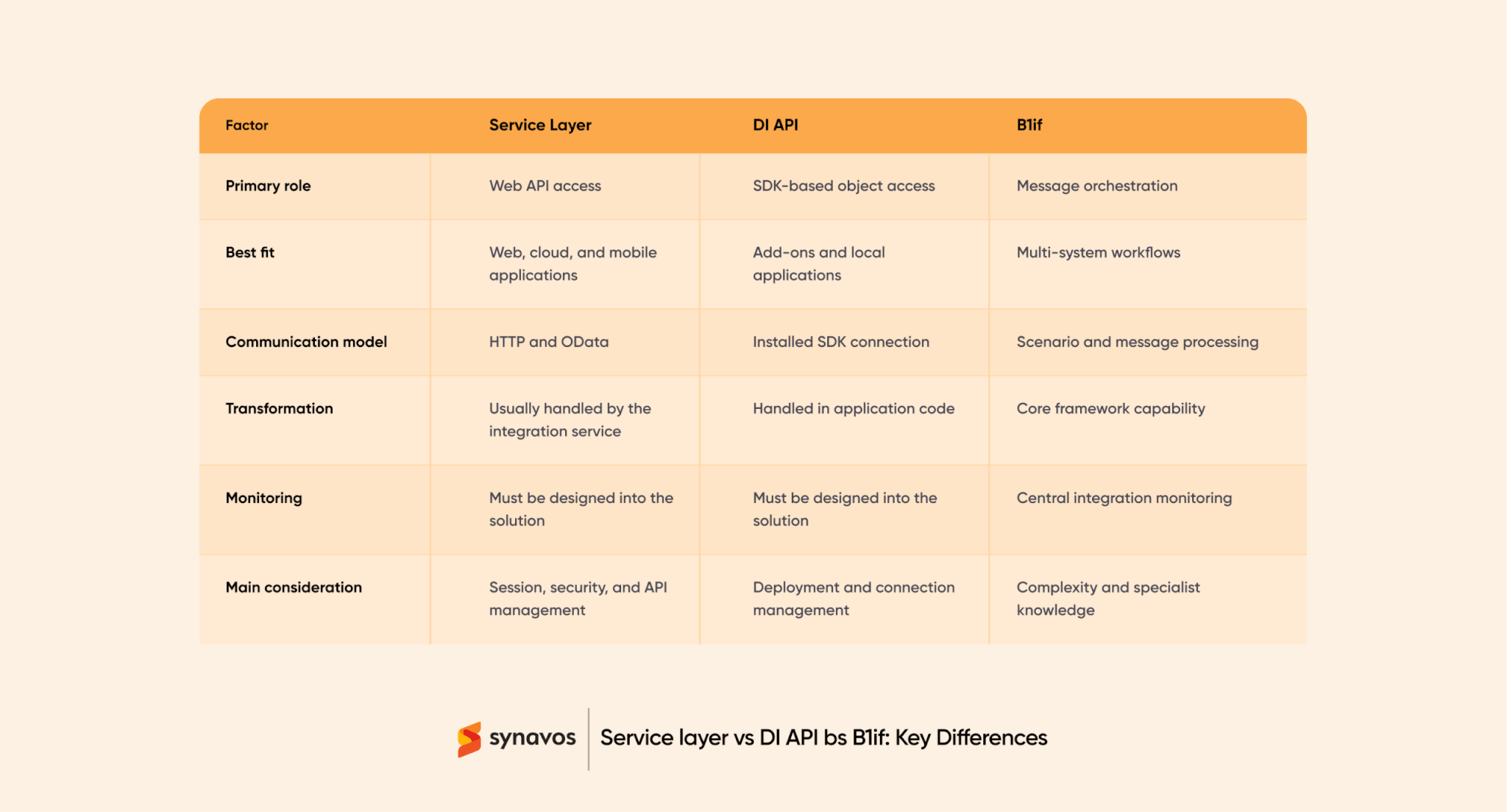
SAP Business One supports several integration technologies. Service Layer provides a web-based interface for working with SAP Business One data and business objects. The Data Interface API, usually called DI API, gives applications access through the SAP Business One Software Development Kit. The Integration Framework for SAP Business One, commonly known as B1if, helps coordinate, transform, and monitor messages across connected systems.
These technologies overlap, but they are not direct substitutes in every situation. A method that works well for a cloud-based customer portal may be a poor fit for an established desktop add-on.
This guide compares the main integration methods during SAP Business One implementation, explains where each one fits, and gives you a practical framework for choosing between Service Layer, DI API, and B1if.
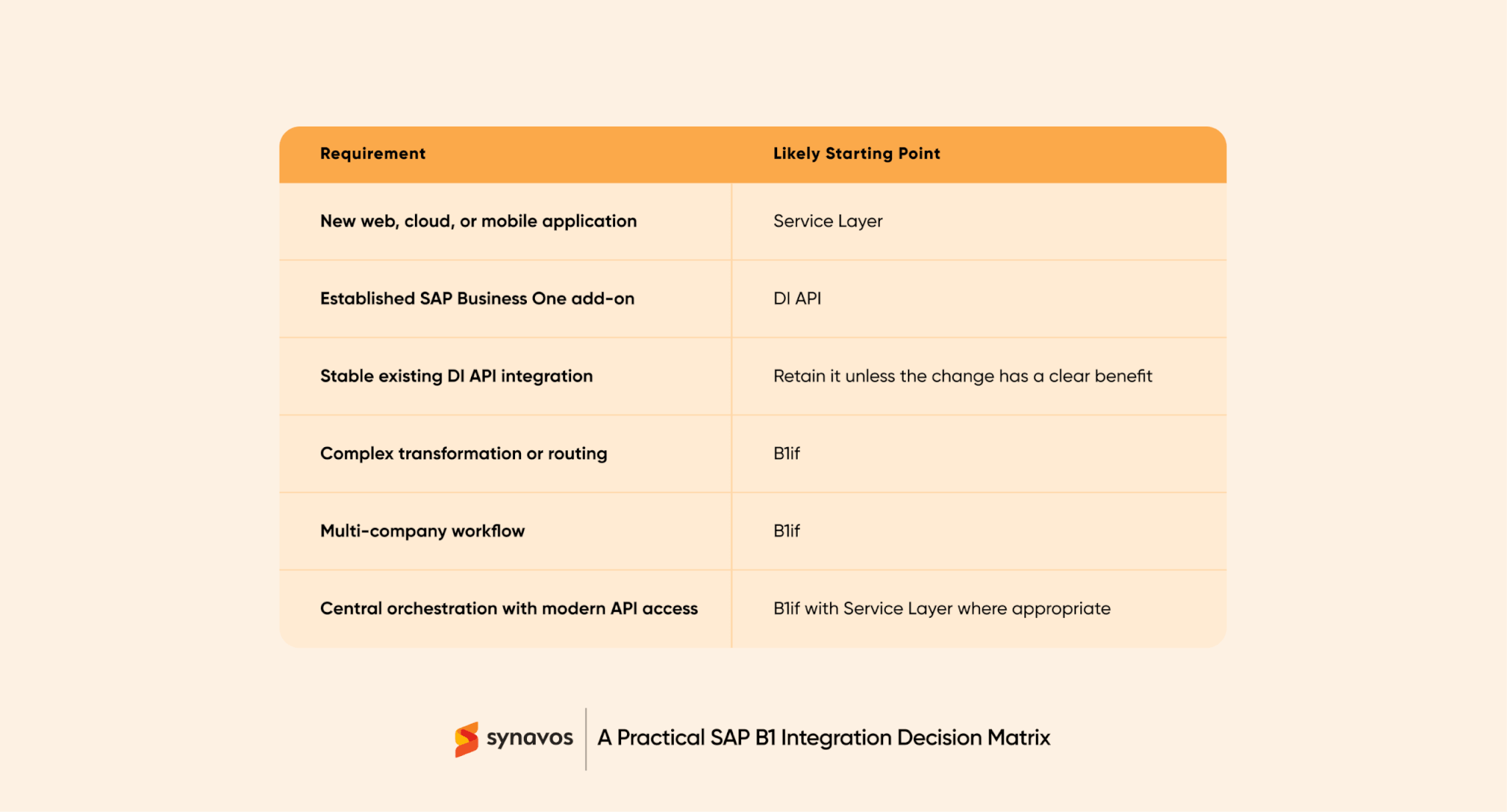
Use Service Layer for most new web, mobile, and cloud integrations. Use DI API for installed applications, established add-ons, or functionality not adequately exposed through Service Layer. Use B1if when an integration requires message transformation, routing, monitoring, multiple systems, or multiple SAP Business One companies.
What SAP Business One Integration Methods Are Available?
SAP Business One offers different ways to exchange data and execute business transactions:
- Service Layer provides web-based access to SAP Business One business objects and services.
- DI API lets an installed application work with SAP Business One through its Software Development Kit.
- B1if, the Integration Framework for SAP Business One, receives, transforms, routes, and monitors messages across integration scenarios.
They are not always direct substitutes. Service Layer and DI API give applications ways to work with SAP Business One. B1if mainly coordinates how messages move through a wider integration process. Some projects use a combination.
If you are still deciding which systems and processes to connect, begin with the SAP Business One integration and automation buyer’s guide.
What is the SAP Business One Service Layer?
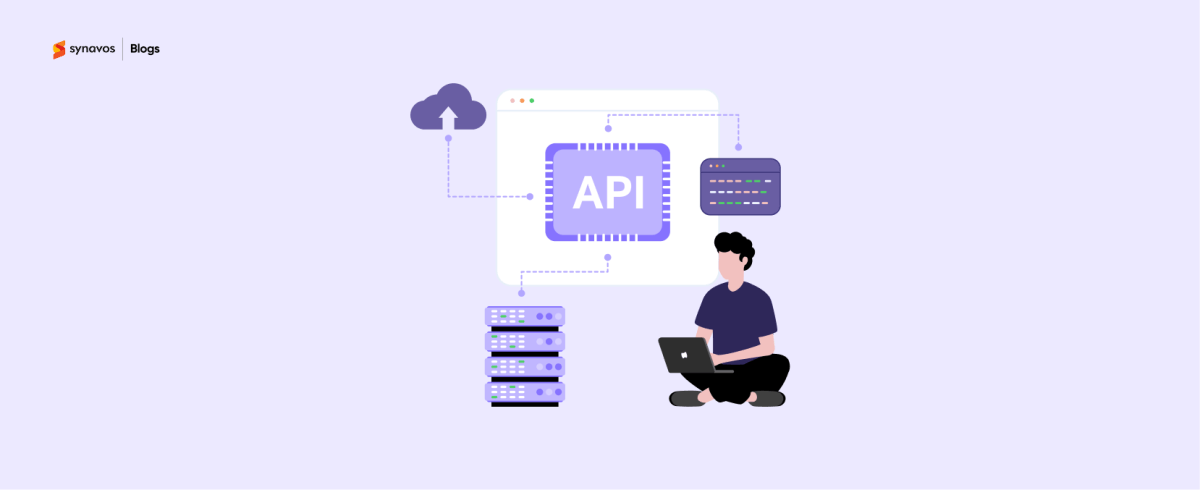
SAP Business One Service Layer is a web API based on HTTP and OData. An external application can use it to create, read, or update supported SAP Business One business objects without operating inside the desktop client.
For example, an online store can send an order to the Service Layer. SAP Business One validates the customer, item, and document information, creates the sales order, and returns the result to the e-commerce application.
When Should You Use the Service Layer?
Service Layer is a strong starting point for:
- Web and mobile applications
- E-commerce integrations
- Customer or supplier portals
- Cloud-based CRM connections
- Near-real-time stock, order, and invoice requests
- Custom applications built with modern development stacks
Before selecting Service Layer, verify that every required business object, service, and action is available in the Service Layer metadata or API reference. SAP documents functional differences and limitations compared with DI API.
Service Layer does not provide a complete integration on its own. Your solution must still manage authentication, sessions, timeouts, duplicate requests, retries, logs, and alerts.
What is SAP Business One DI API?
The Data Interface API, or DI API, is part of the SAP Business One Software Development Kit. It allows an application or add-on to connect to a company database and work with supported SAP Business One business objects.
SAP’s DI API reference lists the services and objects available through the interface. For instance, an application can retrieve an item, change supported properties, or create a business document while using SAP Business One’s object model. That is safer and more supportable than writing transactions directly to database tables, which can bypass application validation and business rules.
When Should You Use DI API?
DI API may be appropriate for:
- An established SAP Business One add-on
- A locally deployed business application
- An existing integration that is stable and supported
- A project suited to the DI API object model
- A team with strong SAP Business One SDK experience
Do not replace a working DI API integration merely because the Service Layer looks more modern. First, identify a measurable reason to change.
The team must manage installed components, connections, version compatibility, errors, and upgrade testing. A public-facing cloud application would normally require a secure service or middleware layer between the external system and the DI API.
What is B1if?
B1if is the common name for the Integration Framework for SAP Business One. Its main purpose is orchestration: receiving messages, transforming data, applying processing rules, routing messages to the right destination, and recording what happened.
A B1if scenario may receive an order from one application, convert its fields into the required structure, determine the correct company database, submit the transaction, and log the result. SAP’s official Integration Framework documentation covers framework administration, development, connectivity, monitoring, and security.
When Should You Use B1if?
B1if becomes relevant when you need:
- Several systems in one business process
- Message transformation between different formats
- Conditional routing
- Multi-company integration
- Reusable integration scenarios
- Central message monitoring
It can be excessive for a simple point-to-point connection. B1if also requires skills in scenario design, transformation, configuration, and troubleshooting.
How to Choose the Right SAP Business One Integration Method
Avoid selecting technology from a feature list alone. Ask these five questions first.
1. Is the connected application cloud-based or local?
A new cloud, browser, or mobile application generally points toward the Service Layer. A locally installed add-on may align with the DI API. Network access and security boundaries should be part of the decision from the start.
2. Is this a direct connection or a multi-system process?
If one application sends a focused request to SAP Business One, a dedicated Service Layer or DI API solution may be enough. If the process moves through several systems, formats, branches, or company databases, B1if may provide useful orchestration.
3. Does the workflow need an immediate response?
A customer waiting for order confirmation may need a near-real-time response; a nightly catalogue update may not. Use real-time processing where it creates business value.
4. What happens when a transaction fails?
A production design must define:
- Which errors should be retried?
- How duplicate orders or invoices are prevented
- Where failed messages are stored
- Who receives an alert?
- How users correct invalid data
- How the systems are reconciled
The failure process is often more important than the successful API demonstration.
5. Who will maintain the integration?
Confirm who owns credentials, certificates, infrastructure, alerts, failed-message recovery, upgrades, third-party API changes, and documentation. Select a method your team or partner can support for the full life of the system.
How Can Synavos Help?
The best integration method is the one that supports the complete business process and remains understandable after go-live. That requires business-process mapping, SAP Business One knowledge, application architecture, testing, monitoring, and clear operational ownership.
Synavos further demonstrates its SAP Business One capabilities through its case studies. In its HBK Blankets case study, Synavos reports implementing SAP Business One within three months, reducing manual processes, and improving operational efficiency. Explore how aligning the platform with real workflows can maximize its impact.
Synavos can assess your connected systems, define data ownership, compare Service Layer, DI API, and B1if, and design the required monitoring and recovery process.
Unsure which method fits your project? Contact Synavos for a free discovery call and initial SAP Business One integration assessment.