Most Odoo projects don't fail on go-live day. They fail in the weeks before it, when data isn't validated, users haven't touched the system, and nobody has agreed on what "ready" actually means.
According to Gartner, by 2027, more than 70% of recently implemented ERP initiatives will not fully meet their original business goals.
That is why going live on Odoo takes more than a finished configuration. An Odoo implementation checklist is a phase-by-phase list of tasks and sign-offs that confirms your data, people, controls, and tax setup are all ready at the same time.
In this blog, we share a practical Odoo implementation checklist covering the Odoo ERP implementation steps to complete before going live, from early decisions and data migration to testing, FBR compliance, and cutover.
1. Define Goals, Ownership & Platform Choices
Start your Odoo implementation with measurable goals. Instead of "better reporting," aim to reduce month-end closing from ten days to four.
Assign one decision-maker to approve scope changes and process owners for sales, purchasing, inventory, and finance. Document these responsibilities in your Odoo implementation plan to prevent confusion and delays.
Next, choose your Odoo edition and hosting option. Community is free but lacks advanced features like Odoo Studio and full accounting, while Enterprise offers these through paid user licenses.
For hosting, Odoo Online is managed but doesn't support custom modules. Odoo.sh allows custom development with Enterprise, while on-premise provides full control but requires internal server maintenance and upgrades.
What to Verify
- Are 3–5 measurable goals written down?
- Is there one person who approves scope changes?
- Does each major process have a named owner?
- Are go/no-go criteria agreed before configuration starts?
- Are the Odoo edition and hosting option agreed?
2. Finalize Processes and Customization Scope
Map how each process works today from start to finish, such as order-to-cash and purchase-to-pay, before configuring anything. This step in the Odoo implementation process shows where Odoo fits as standard and where it doesn't.
A sound Odoo implementation methodology treats customization as the exception. Every custom module adds cost and testing effort at each future upgrade, so use it only when standard Odoo can't support a process that matters to your business.
What to Verify
- Are end-to-end processes mapped and approved?
- Is every customization linked to a clear business need?
- Are approval rules defined, including backup approvers?
- Does each integration have a clear system of record?
3. Clean and Validate Your Data
Data migration causes more go-live problems than any other stage of the Odoo implementation process. Legacy data is usually messier than expected, and duplicates or wrong units carry straight into Odoo.
Decide what to migrate: data needed on day one, useful history, and records that can stay archived. Then clean it, load it in sequence (chart of accounts, products, bills of materials, customers and vendors, stock, open orders), and test it at least twice.
What to Verify
- Have duplicates been removed before the first test run?
- Have two test migrations matched record counts and totals?
- Has the CFO signed off on opening balances for receivables, payables, and stock?
- Is the legacy period closed before cutover?
4. Test Real Business Workflows
A sales order that works in a demo can still fail when it has to become a delivery, an invoice, and a payment. Testing should follow your real workflows, with real products and quantities, in a staging copy of the system.
Include the exceptions too: returns, credit notes, partial deliveries, and cancelled orders. These rarely appear in demos but always show up in the first week.
What to Verify
- Have complete flows from sales order to payment and purchase order to vendor bill been tested?
- Has finance checked the accounting entries each flow creates?
- Have real users signed off on user acceptance testing (UAT)?
For a detailed look at Odoo implementation cost, read our blog titled "Odoo Implementation Cost: A Complete 2026 Breakdown".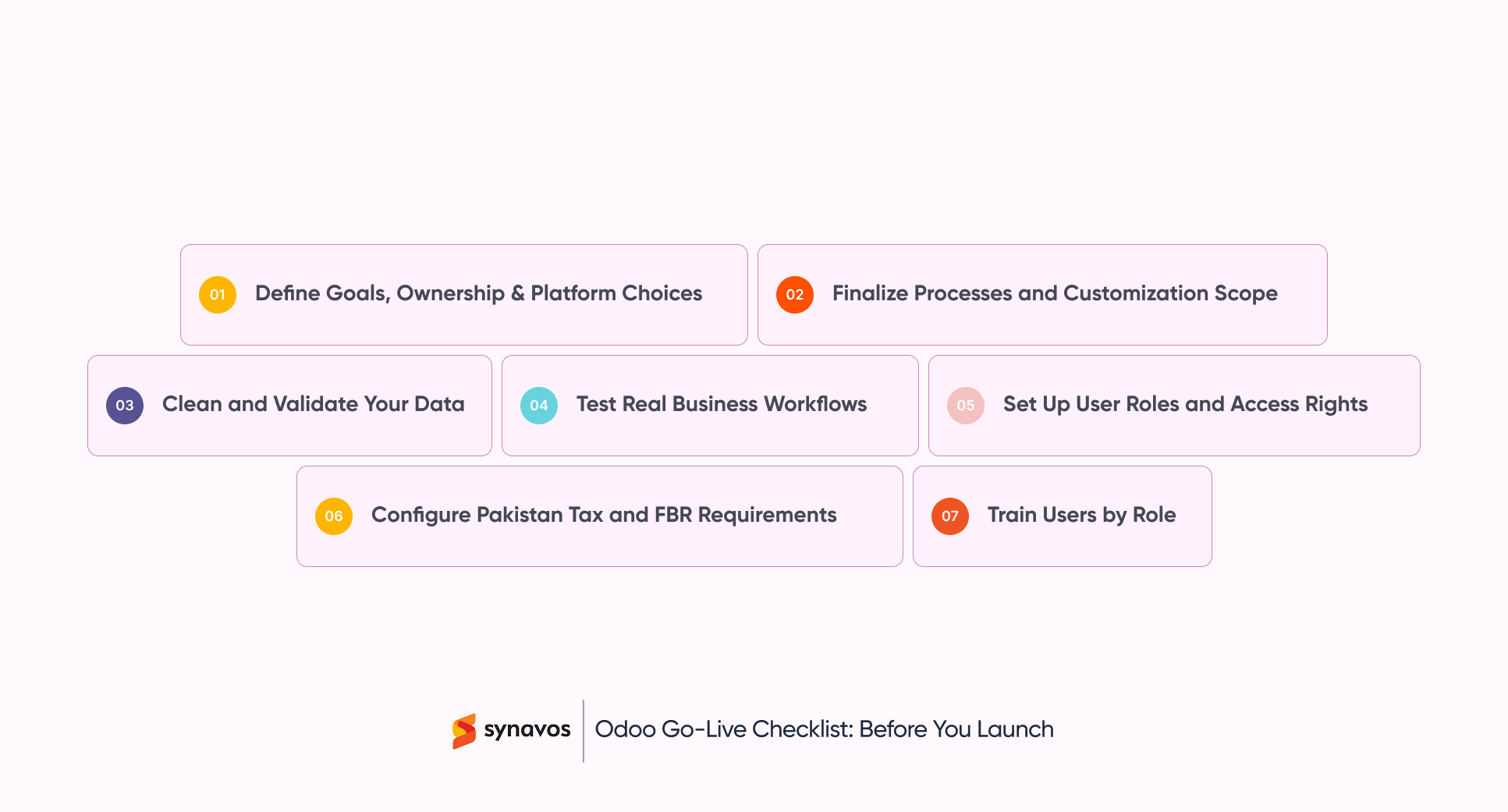
5. Set Up User Roles and Access Rights
Giving everyone broad access is faster during setup, but it creates risk after go-live. Each role should see and do only what its job requires.
For example, should salespeople be able to change prices? Should the person who posts a payment also approve it? Answer these questions before go-live, not after an audit.
What to Verify
- Is there a role matrix for every user group?
- Are duties separated for payments, vendor creation, and stock adjustments?
- Are demo data and the default admin account secured?
6. Configure Pakistan Tax and FBR Requirements
For Pakistani businesses, a wrong tax setting can stop invoicing on day one. Sales tax, provincial sales tax on services, and withholding tax all need to be configured and tested before the first live invoice.
If your business falls under FBR's digital invoicing requirements, Odoo needs an integration to send invoices to FBR; standard Odoo doesn't do this. Tax rules change with each federal budget, so confirm current requirements with the Federal Board of Revenue or your tax advisor.
What to Verify
- Are federal and provincial tax codes set up correctly?
- Are withholding tax rules applied to the right purchases and payments?
- Are NTN and STRN added to customer and vendor records?
- Has your tax advisor reviewed sample invoices?
7. Train Users by Role
Training works best when it happens close to go-live and is built around each person’s daily tasks. A warehouse user needs to know how to receive stock and process deliveries, not how every module works.
Name one internal champion in each department. They answer routine questions after launch and catch issues before they reach your support team.
What to Verify
- Has each role practiced its own daily tasks in the test system?
- Was training held within two to three weeks of go-live?
- Is there a champion in each department?
- Do users have short how-to guides for common tasks?
Why Choose Synavos for Odoo Implementation?
Every business has different processes, data, and tax requirements, so no two Odoo go-lives look the same. That's why choosing the best Odoo implementation partner matters as much as choosing the right edition and hosting.
Synavos is an Odoo Silver Partner that helps businesses plan, test, and prepare every part of their Odoo implementation before the switch.
From process mapping and data validation to FBR tax configuration and role-based training, Synavos makes sure nothing is left for launch day. Our proven track record across Pakistan, KSA, and the UAE reflects this structured approach.
Start with a conversation and get clarity on what your Odoo go-live needs.