Running a business means managing countless moving parts, from sales and inventory to accounting and team coordination. But when these processes rely heavily on manual effort, even simple tasks can become time-consuming.
Odoo 20 changes how businesses handle these challenges. With AI-powered automation, smarter workflows, and significant improvements across its core applications, the latest release moves beyond traditional ERP capabilities to make everyday operations more efficient and connected.
What are the new features in Odoo 20? Let's explore 10 major Odoo 20 features and how they work.
1. AI-Powered Agents and Workflow Automation
What if routine business tasks could run without someone handling every step? Odoo 20 introduces AI agents that work with natural-language instructions and can take action through configured tools.
You can set up an agent to assign incoming leads, confirm sales orders when matching emails arrive, create projects after contracts are signed, or alert teams about low stock. Agents can also create or update records and process information from files.
Odoo provides visibility into these actions, so users can review what an agent has done. The result is automation that goes beyond simply generating text.
2. Native MCP Integration with External AI Tools
AI does not have to stay inside Odoo. Odoo 20 Enterprise introduces a built-in Model Context Protocol (MCP) server that allows compatible external AI assistants to connect with business data.
Through Odoo's MCP server, an authorized assistant can search records, retrieve information, and perform permitted updates. For example, it could check open opportunities or update customer details without a team member switching between applications.
Access is governed by the connected user's permissions. This makes MCP a useful foundation for connecting Odoo workflows with external AI tools.
3. Smarter CRM and AI-Assisted Lead Generation
Finding qualified prospects can take hours of manual research. Odoo 20 introduces faster ways to discover leads and organize sales pipelines.
Its CRM connects to a Dun & Bradstreet-powered directory covering more than 580 million entities, which allows teams to search for potential customers by industry and location. Odoo can also turn website visitor information into leads through IP detection, import contacts from Gmail or Outlook, and create opportunities from scanned business cards.
For teams managing multiple pipelines, automatic lead assignment helps route new opportunities to the right sales team.
4. Advanced Accounting Automation and AI Financial Assistant
Finance teams need timely answers, not another round of spreadsheet searches. Odoo 20 adds an Accounting AI Assistant that can answer questions using company financial reports.
Users can ask about outstanding receivables or cash flow and investigate reconciliation issues with AI-assisted reviews. The release also improves vendor bill handling and reconciliation workflows.
Another addition is the ability to initiate eligible vendor payments directly from Odoo through supported payment service providers, either individually or in batches. This connects financial analysis and routine payment activities more closely.
For businesses in Pakistan, Odoo 20 also adds a native integration with the FBR e-invoicing system for registered businesses, in line with S.R.O. 1852(I)/2025. Retailers get a separate FBR integration in Point of Sale for real-time reporting, which is mandatory for Tier-1 retailers. This means invoices can be reported to FBR directly from Odoo instead of through a separate connector.
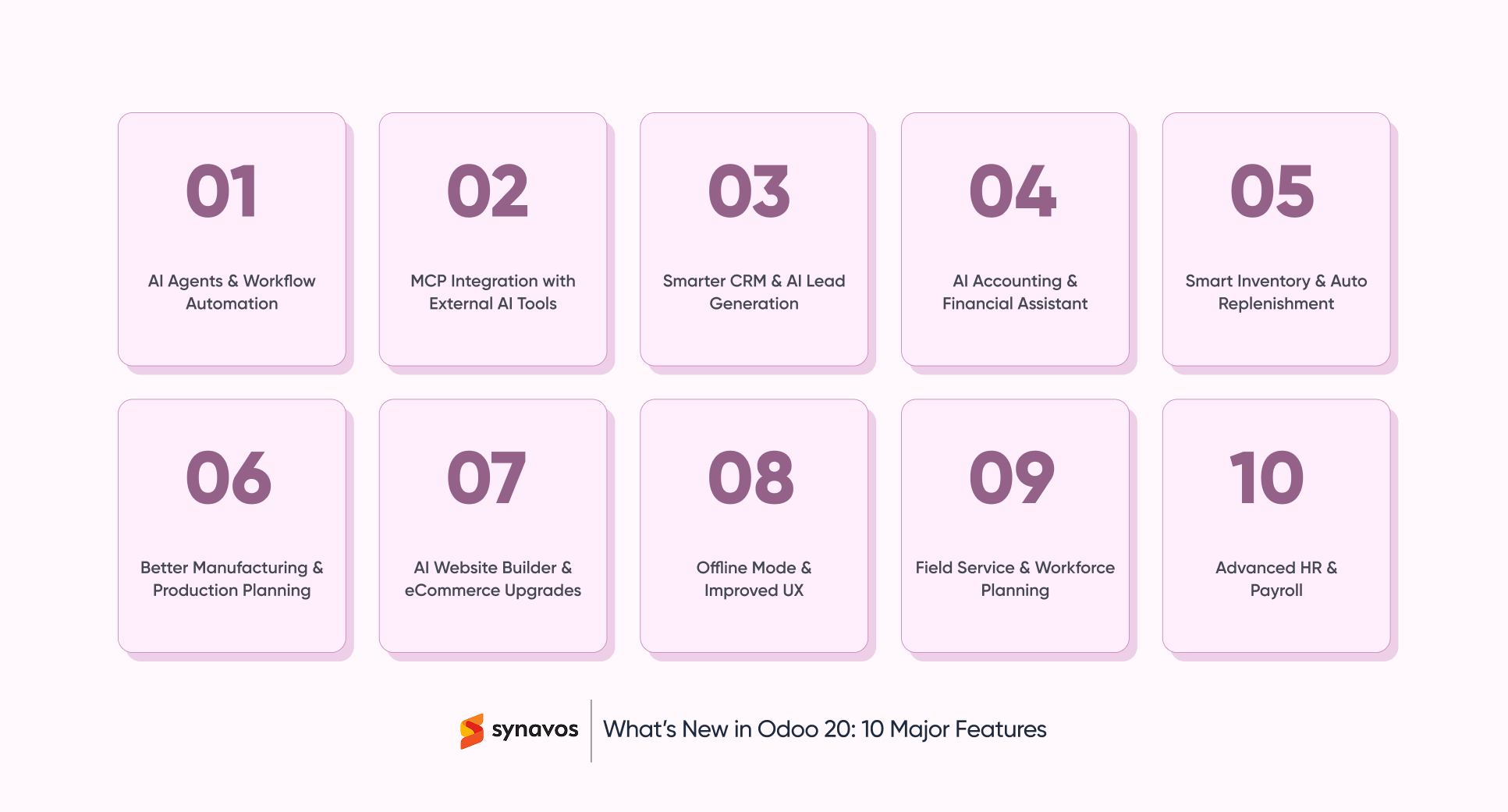
5. Intelligent Inventory Management and Automated Replenishment
Running out of a popular product is frustrating. Holding too much stock is expensive. Odoo 20 helps teams make more informed replenishment decisions.
The system suggests minimum and maximum stock levels based on demand history, desired stock coverage, and order frequency. Purchasing teams can use these recommendations to prepare orders rather than calculate reorder quantities from scratch.
Additional updates include supplier quality information, AI-assisted purchasing analysis, improved stock aging reports, and automatic matching of vendor bills with purchase orders to flag discrepancies.
6. Improved Manufacturing Planning and Production Workflows
Production often slows down when one operation must wait for an entire batch to finish. Odoo 20 introduces continuous production to address this bottleneck.
Operators can record quantities completed on a work order. When enough units are ready, the next production operation can begin without waiting for the full batch.
Manufacturers also get improved Gantt and Kanban planning views, drag-and-drop scheduling, clearer work-order priorities, and side-by-side Bills of Materials (BoM) comparisons. These tools make it easier to adjust schedules and track production progress.
7. AI-Powered Website Builder and eCommerce Enhancements
Creating a new website page no longer has to start with a blank screen. Odoo 20 lets users describe a page in plain language and generate layouts, content, and website building blocks with AI.
The assistant can also help edit text, translate content, and improve SEO elements.
For online stores, Odoo 20 adds product variant thumbnails, a free-shipping progress bar, customer-selected delivery dates, and return requests through the customer portal. Eligible customers can also confirm orders with the new Pay on Invoice option.
8. Offline Mode and Improved User Experience
An unstable internet connection should not stop every task. Odoo 20 expands offline support so users can create, edit, archive, and delete supported records while disconnected.
Previously run searches remain available offline, and changes can synchronize when the connection returns. This is particularly relevant to field teams and employees working in locations with unreliable connectivity.
The release also improves everyday navigation, with multi-record drag-and-drop actions in list and Kanban views and more convenient mobile interactions.
9. Enhanced Field Service and Workforce Planning
Managing on-site teams means juggling appointments, locations, and technician availability. Odoo 20 brings Field Service functionality into the Planning application to organize these activities in one place.
Managers can drag and drop service interventions onto calendars, review schedules in Gantt views, and use map-based information and travel-time calculations when assigning work.
Equipment details, service history, materials, and related records help technicians prepare for visits. The integrated workflow makes it easier to connect scheduling with the actual work taking place at customer sites.
10. Advanced HR and Payroll Management
Payroll errors often start with configuration problems that go unnoticed until processing day. Odoo 20 adds a redesigned Payroll dashboard that highlights warnings earlier.
HR teams can simulate payroll runs, preview payslips before validation, and calculate salary scenarios directly from employee profiles. They can also work backward from a target net salary to estimate related compensation figures.
Other updates include working schedules defined by hours per day and the ability to incorporate eligible employee expenses into payroll calculations.
Simplify Your Odoo 20 Journey with Synavos
Odoo 20 brings smarter ways to manage everyday operations, from AI-powered automation and lead management to accounting, inventory, manufacturing, and workforce planning. However, making the most of these features starts with understanding which capabilities best fit your business needs.
As an official Odoo Silver Partner, Synavos brings a proven track record of delivering tailored Odoo solutions across industries. Serving businesses across Pakistan and the wider GCC region, our team provides end-to-end Odoo implementation, customization, integration, and support services to help organizations achieve their operational goals.
Ready to explore what Odoo 20 can do for your business? Contact Synavos today and take the next step toward smarter business operations.